Pentastic
Screenshots
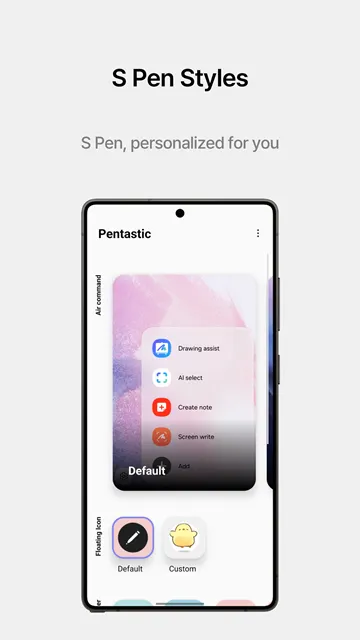
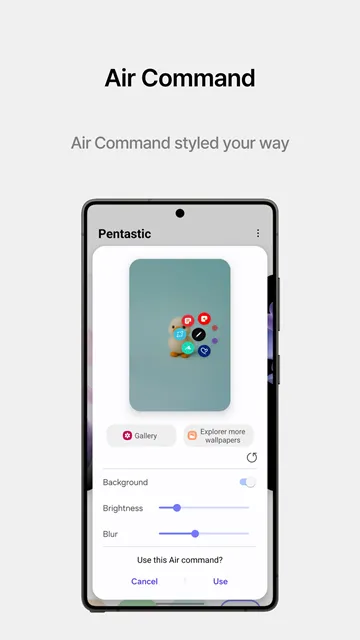
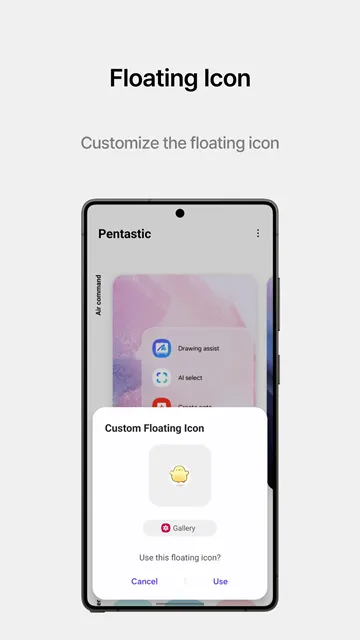
Pentastic offers a fresh way to customize your Samsung S Pen experience. Many stylus users want more control over their mobile devices. Pentastic solves this problem by giving you deep design options. You can easily modify your user interface using this tool. For example, you can alter menus, sounds, and icons. This official module belongs to the popular Good Lock family. Consequently, it integrates perfectly with your native system software. You will enjoy a smooth performance without any operational lag. Therefore, modifying your stylus settings becomes an enjoyable task.
Stylus customization can completely transform how you use your phone. Pentastic targets users who love deep visual personalization. Standard menus can sometimes feel boring after a few months. However, you do not have to settle for default options. Pentastic allows you to express your personal style through menus. You can create a look that matches your unique aesthetic. The App elevates your daily tablet and phone interactions. You will feel a sense of ownership over your workspace.
Many people buy premium devices for their advanced features. Yet, they often leave the software settings on default mode. You can break this habit by using creative customization modules. Pentastic provides an easy path to a custom interface. It gives you immediate results without complex setup steps. You can change your theme whenever you want. This flexibility keeps your mobile device feeling brand new. You can surprise your friends with a unique phone setup.
What is the Pentastic App?
The Pentastic app is a specialized customization tool for compatible stylus devices. Samsung developed this software module to expand user control. It acts as an extension for standard stylus features. Specifically, it focuses on visual aesthetics and functional shortcuts. Users often install it to break away from standard limitations.
You can find this tool within the Samsung personalization ecosystem. It provides direct access to hidden style menus. Therefore, you do not need advanced technical skills to use it. The setup process is very simple and fast. After installation, Pentastic opens up a new world of design possibilities. You can instantly see changes on your screen. This immediate feedback helps you choose the best styles quickly.
Many users wonder if this software is safe for phones. Because it comes from an official developer source, it remains secure. It does not drain your battery layout unnecessarily. Furthermore, it respects your device security settings completely. You get a reliable utility that improves your interface. It works silently in the background to provide a smooth experience. You do not need to worry about system crashes.
Why You Need This Styling Tool
Standard stylus menus offer limited functionality and basic designs. You might feel restricted by these plain default themes. Fortunately, you can change your experience with the right utility. This tool provides options that standard settings ignore completely. You can unlock your creative side with these options.
Personalization can improve your mood during long work sessions. When your interface looks good, your productivity often increases. Pentastic gives you the tools to build an ideal workspace. For instance, you can match your stylus theme with wallpapers. Additionally, you can choose audio clips that make you smile. Customization makes your device feel unique and tailored for you.
Regular menus often clutter your screen with too many icons. This tool allows you to simplify your view easily. As a result, you face fewer distractions while writing. A clean screen helps you think more clearly every day. Therefore, this utility holds a functional purpose beyond decoration. It transforms your screen into a clean canvas.
How the Pentastic App Enhances Your Workflow
The Pentastic app does more than just change visual elements. It directly improves your speed when navigating complex tasks. By using custom shortcuts, you can open favorite tools instantly. For example, a quick double-tap can launch a notepad.
This efficiency saves valuable time throughout your busy day. You no longer need to search through crowded app drawers. Instead, your essential tools remain one click away. Pentastic optimizes your movements to reduce screen clutter. Consequently, your focus stays on your actual work. Writers, artists, and students can all benefit from these shortcuts.
Imagine you are in a sudden meeting and need notes. Without shortcuts, you must unlock the phone and find notes. With Pentastic, you simply double-tap the screen with your stylus. The note page opens immediately for your convenience. This speed ensures you never miss important information. Therefore, it changes your device into an efficient platform.
Supported Devices and Requirements
Before downloading this utility, you should check your device compatibility. Pentastic requires a device that actively supports the S Pen. This includes many Note series phones and modern Ultra models. Furthermore, several premium tablets can run this software perfectly.
Your device must also run compatible system software. Generally, it works alongside the official Good Lock framework. Therefore, ensure your operating system is up to date. Updating your software guarantees that all custom features run smoothly. If your device meets these criteria, begin customization immediately. Enjoy a stable experience without crashes or system errors.
Some users try to install it on unsupported hardware. This often leads to errors or installation failures. Always check your device specifications before proceeding. If your phone lacks stylus hardware, Pentastic will fail. Knowing these requirements saves you time and effort during setup. It prevents frustration during the installation process.
Key Features of the Pentastic App
The Pentastic app offers several distinct features to upgrade your interaction. Each feature provides a specific way to modify your interface. Let us explore these choices in detail below.
Custom Air Command Layouts
The Air Command menu appears when you remove your stylus. Pentastic changes this layout completely according to your choice. Instead of the default vertical list, choose alternative shapes. For example, you can select a circular wheel menu. Alternatively, you can pick a compact line layout. These shapes change how you access your shortcuts. They make screen navigation much more comfortable for your hand.
A circular layout allows you to scroll through items easily. On the other hand, the line layout keeps things minimal. You can choose the design that fits your hand size. Consequently, your daily usage feels more natural and smooth. Changing the layout takes only a few simple taps.
Here are the popular layout options:
- The classic compact line layout.
- The modern circular wheel menu.
- The retro style grid panel.
- The expanded full screen layout.
Creative Pointer Shapes
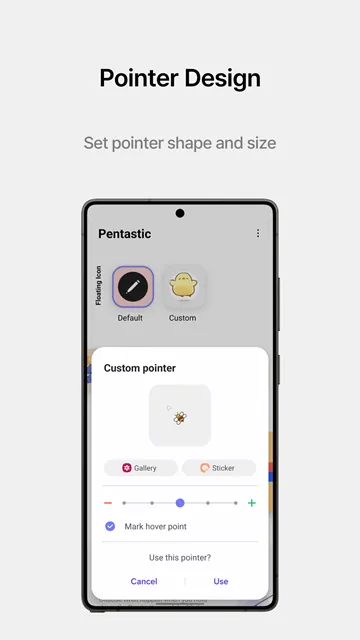
The default pointer is usually a small, simple dot. Pentastic allows you to replace this dot with icons. For instance, you can choose an arrow or heart. You can even choose cute cartoon characters like crocodiles. If you prefer a unique style, upload custom images.
Then, your favorite picture becomes your active stylus pointer. This feature adds a playful element to screen interactions. It is especially helpful for digital artists who need visibility. A larger or brighter pointer helps you see your lines. Therefore, this feature combines fun with practical utility.
Personalized Sound Effects
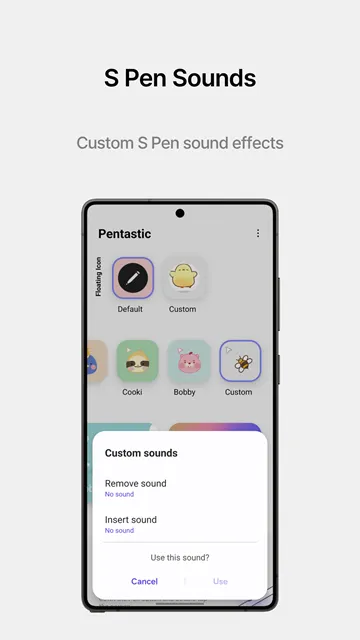
Every time you detach your stylus, your device makes noise. Pentastic lets you customize these specific audio triggers. You can select from a pre-made list of sounds. For example, you can choose a futuristic laser sound. You can also use a classic pen-clicking noise.
Additionally, you can upload your own short audio files. This customization ensures that your device sounds exactly right. You can even set a sound for inserting the stylus. As a result, your phone reacts acoustically to physical actions. This creates a deeply satisfying sensory experience every time.
Double Tap Quick Shortcuts
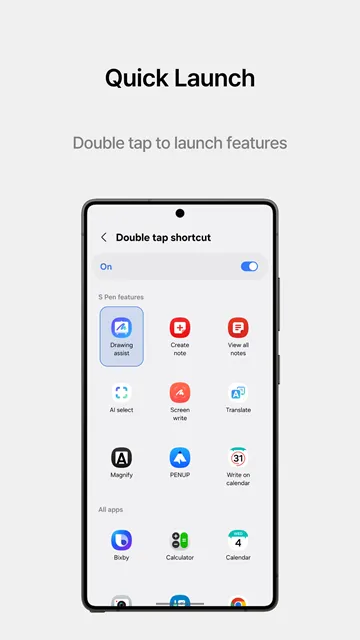
Speed is crucial when you need to capture quick thoughts. Pentastic includes a powerful double-tap shortcut feature. You hold down the stylus button and tap twice. Then, the system instantly launches your pre-selected tool.
You can link this shortcut to any application easily. Consequently, you can start drawing within a single second. This feature eliminates unnecessary navigation steps completely. It works even when the screen is locked sometimes. Therefore, you gain instant utility with a simple gesture.
Custom Theme Backgrounds
Your menus do not have to look dark or plain. Pentastic allows you to change the background of panels. You can choose different colors to match your mood. Furthermore, you can apply blur effects to the image.
This adjustment makes your menu items look clear. Your menus will blend perfectly with your overall theme. You can also adjust the transparency levels of menus. This ensures that you see your main screen underneath. Custom backgrounds provide a polished look to your interface.
Practical Tips for Stylus Customization
To get the best results, experiment with different combinations. Do not stick to the first style you create. Instead, try matching your custom pointer with your background. For example, use a futuristic pointer with neon styles.
Next, consider how your shortcuts impact your daily routine. Assign your most frequent task to the double-tap gesture. This setup reduces physical strain during long usage sessions. Finally, keep your custom audio files short and clean. High-quality sounds make the interface feel much more premium. Regular adjustments will keep your user experience feeling fresh.
You can also save different profiles for various environments. For example, choose a quiet sound profile for work. Then, switch to a fun profile at home. This flexibility allows your phone to adapt to you. Pentastic makes these quick adjustments incredibly easy to manage. You will always have the perfect setup ready.
Conclusion
Pentastic offers an excellent way to personalize your stylus experience. It replaces boring default layouts with beautiful, functional designs. You can easily modify pointers, sounds, and shortcut menus. Consequently, your device feels completely unique to you. The tool enhances both your style and daily productivity. If you own a compatible device, try this customization. Download Pentastic today to unlock your full stylus potential.